New features in StoryLiner V1.5
In this version the focus is set on the storyboarding workflow and the UI again, and in particular on the distinction between Camera Shot and Storyboard Shot, on the use of camera background images and on the Edit Board settings.
— Available Now !!! —
Current available version is: StoryLiner V. 1.5.32 (April 1st, 2026)
If you own a Studio Edition, the latest package is already available in your product page on SuperHive Market (formerly Blender Market). Follow these instructions for the installation.
Important notes
- This version is ONLY for Blender 4.4 up to 4.5.
- The version for Blender 5 is here. It has the features below plus some more.
- I’m highly looking for feedback. When you test the version, please share your thoughts and experience with me on the Spitfire Storyboards Discord – StoryLiner support channel or by sending me an e-mail.
- Features presented below may be available in some package editions of StoryLiner only. See the Differences Between Editions.

💡💡💡 Same advice as usual when using StoryLiner: Watch the tooltips !!! 💡💡💡
Latest Changes
- V 1.5.20:
- Carefully read the Breaking Changes log !!
- Camera Shots have been renamed Action Shots
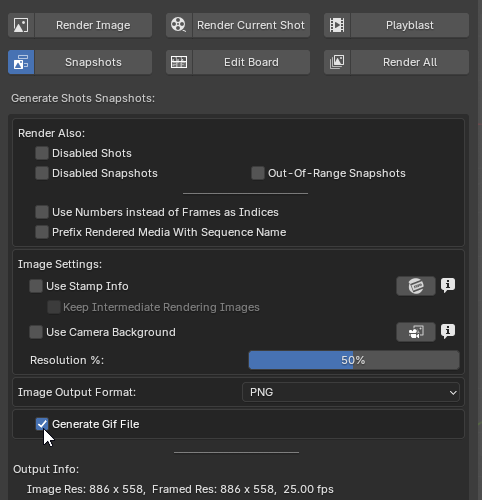
- Export edit to animated Gif image thanks to the snapshots (experimental)
- Added a project name and logo to the scene Sequence Settings that can be used in Stamp Info and in the Edit Board
- Fixed the import of Final Cut XML files for the sequence conformation when no sequence name is profited
- V 1.5.17:
- PDF Edit Board improvements:
- Full support for shots and snapshots notes, action and sound notes
- Japanese layout now has full support for Japanese language
- Introduction of a Thumbnail layout, where only shot names and snapshot images are displayed
- Many layout settings are now exposed: font size, borders, display of notes…
- Python dependencies are now correctly installed on Linux, thanks to path fix on the venv
- Added a Copy to Clipboard post batch rendering option to Still renderings
- Made the viewport frames (autokey, camera manipulation…) visible also when Overlays are turned off (can be changed in the Preferences)
- Fixed continuous draw mode that was broken since V1.3.442
- PDF Edit Board improvements:
- V 1.5.12:
- Japanese layout for exported PDF Edit Board, and more controls exposed
- Full rendering support for camera background images and videos when using Eevee renderer
- Easy manipulation of camera background images from the Viewport Toolbar
- V 1.5.10:
- Easier installation, security increased!
StoryLiner now uses its own Python virtual environment. The installation is now as simple as drag and dropping the add-on package into Blender and press Ok. Admin mode and Blender restart are not required anymore. - All the Camera Background image settings are now exposed in the Camera BG property panel of the selected shot. They are now animatable.
- Easier installation, security increased!
- V 1.5.4:
- It is now possible to insert images at 3 different levels in the rendered layers of Stamp Info
- Camera Background images can now be rendered in the final image
- V 1.5.3:
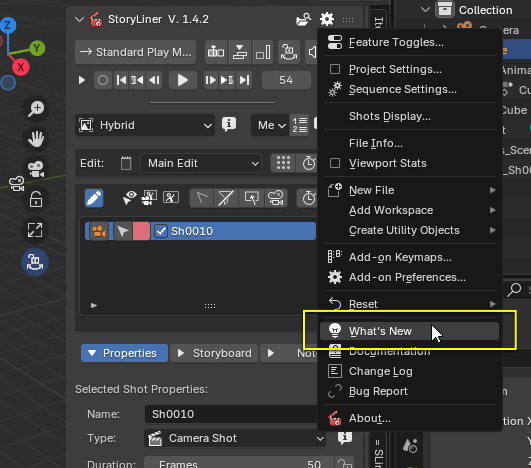
- Added a What’s New menu item to quickly see the new features description
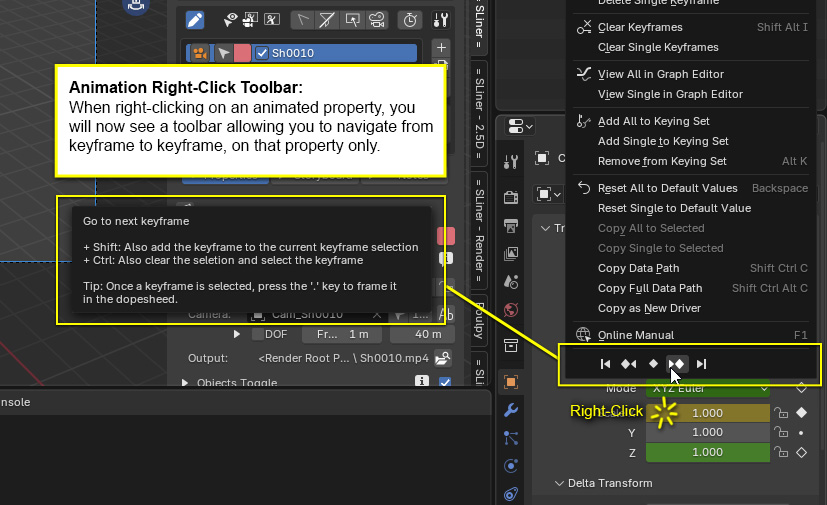
- An Animation RC Toolbar is now available in the right-click menu on animated properties
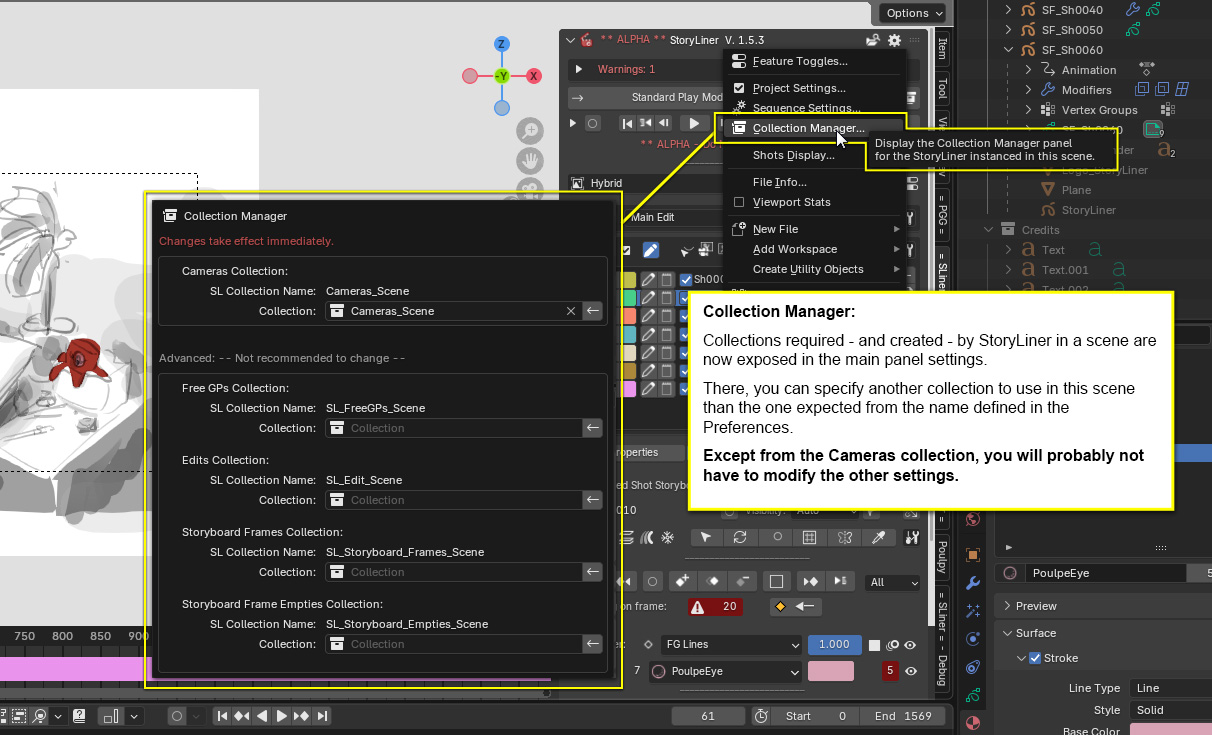
- Introduced a Collection Manager for better control over the collection gathering the cameras as well as for collections internally required by StoryLiner
- Exposed default value for camera lens in Preferences and Project Settings
- V 1.5.1:
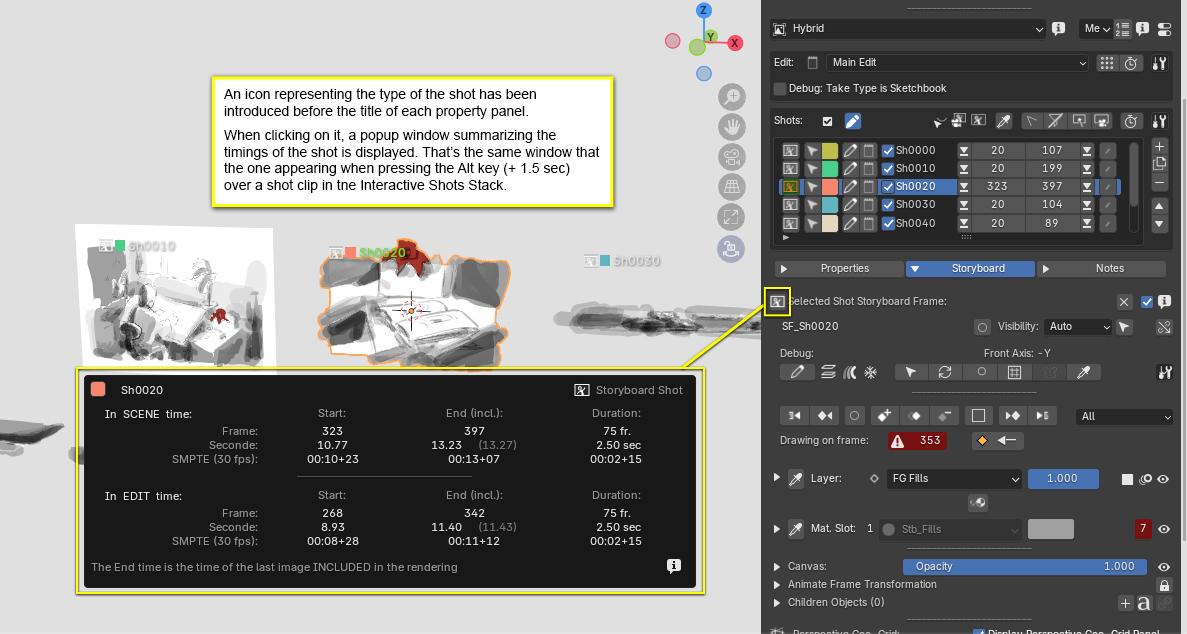
- Easier access to the shot timings
Breaking changes
Compared to any previous version, StoryLiner V1.5.20 introduces the following changes. They can impact the settings of your existing files.
- Camera Shots have been renamed Action Shots
In order to insist on the difference of use and behavior between 2D shots (called Storyboard Shots) and shots based on cameras that are shooting a 3D animation, and which are then part of the action in a way, these last ones are now called Action Shots.
This is purely a terminology and UI change, there is no modifications on the data. - Stamp Info has a new item in its logo mode list to get the logo that has been specified in the Sequence Settings. This item is now used by default.
UX / UI
What’s New quick link
Quicky go to the most recent features list thanks to that new What’s New menu item!
Shot timings
The timings of a shot are now better exposed in every shot property panel. Just press on the icon preceding the panel title, a popup window will appear at provide a synthesis of the shot time values.
Japanese and Thumbnail layouts for Edit Boards
In addition to the “Classic” horizontal layout that we commonly use for storyboards, StoryLiner now has 2 new layouts:
- “Japanese style” vertical layout preset,
- “Thumbnail” layout, where only the shot names and snapshot images are displayed.
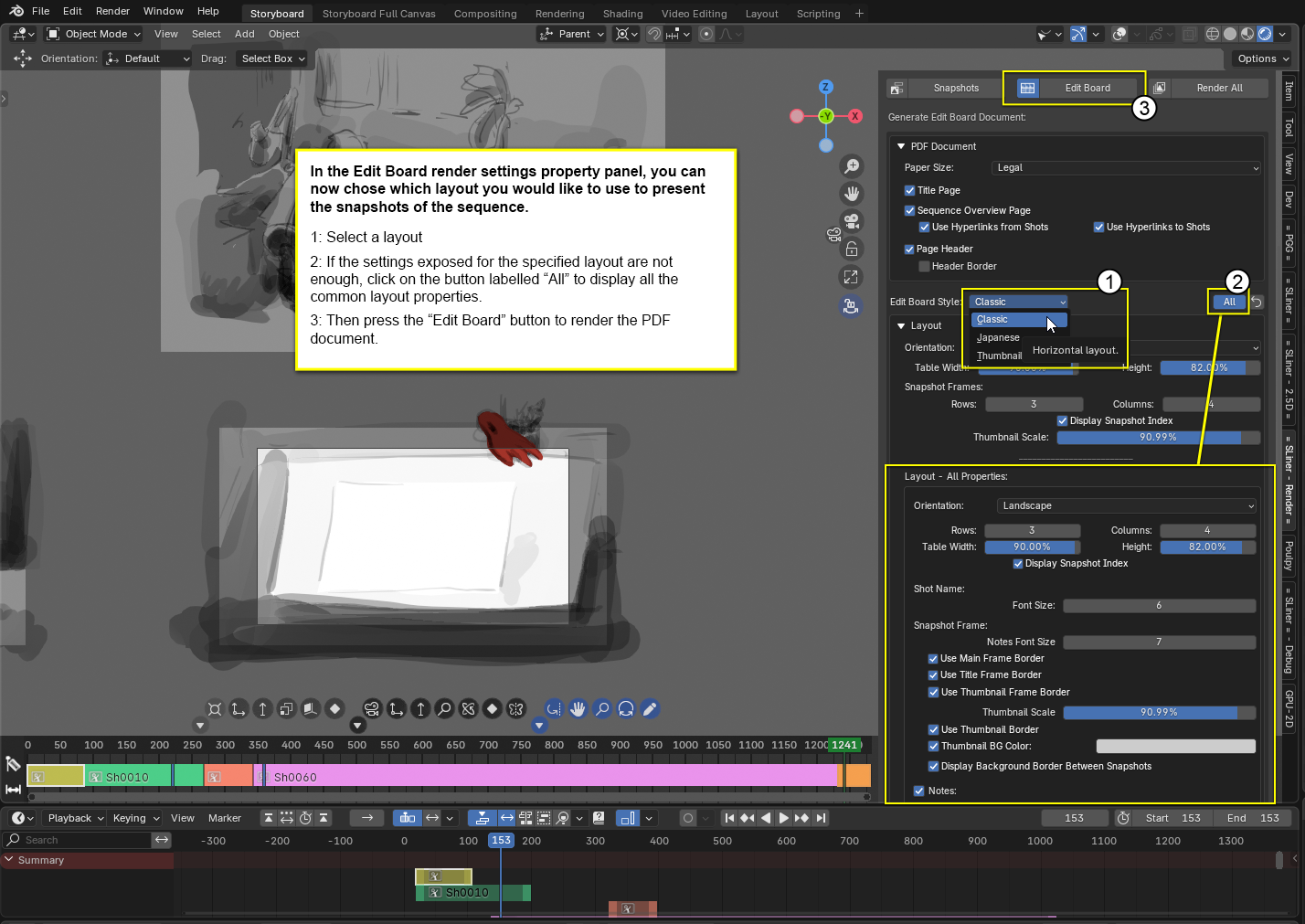
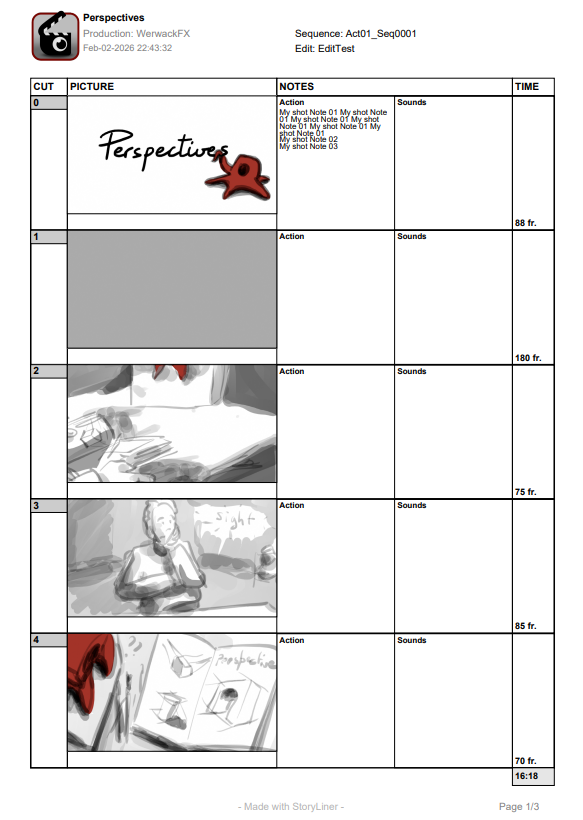
Many settings have also been exposed in order to offer a better control over the text, borders, notes…
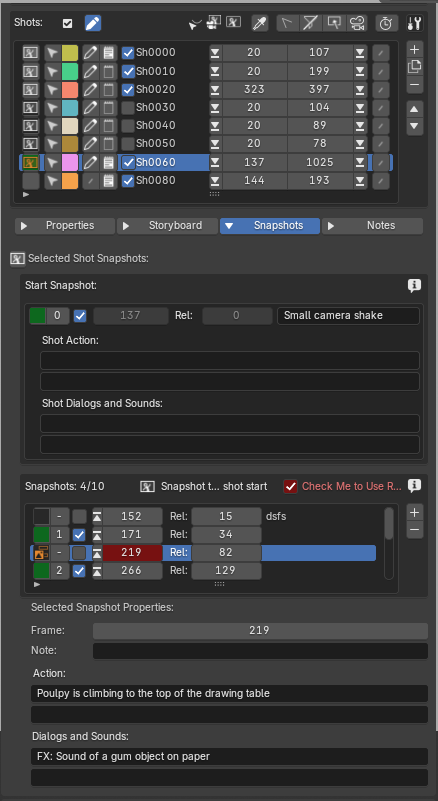
In addition to the notes already on the shots, snapshots now have 2 new text fields dedicated respectively to action and sounds notes:
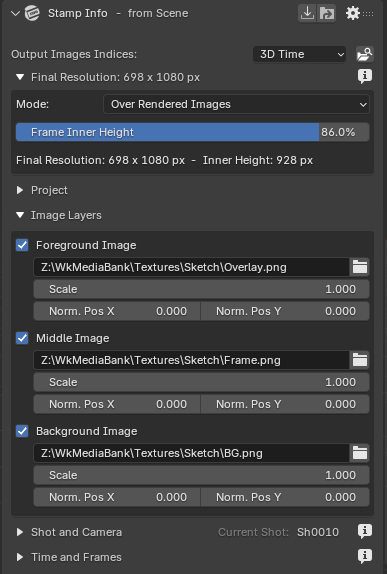
Background / midground / foreground images in Stamp Info
In order to provide some framing and background images for sketches, Stamp Info received a new section allowing to insert images at 3 different places in the composited final image.
This is still an early feature. More controls will come soon.
Camera Backgrounds
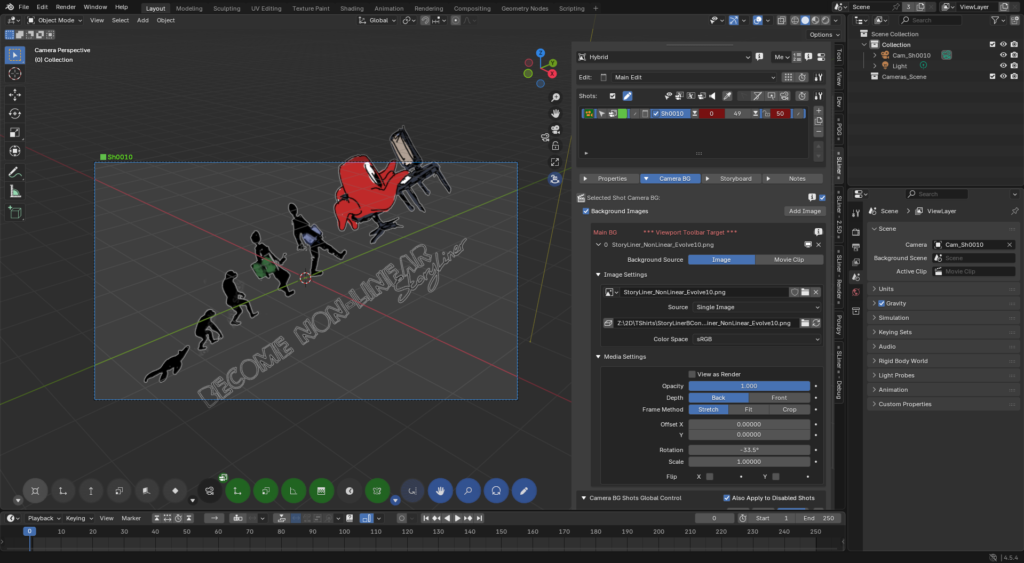
Camera background images and videos can now be rendered
A great limitation of Blender is that the images or videos used as backgrounds in the viewports for the cameras cannot be rendered as part of the final image.
Well… those times are behind! Now, if a shot camera has a visible background, and if the Use Camera Background parameter is checked in the Render panel, then this media will be also rendered and composited to the final image!
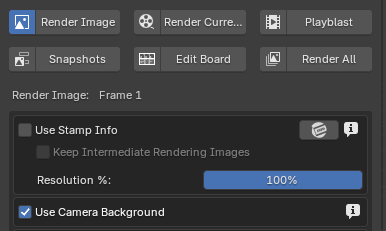
When a real-time rendering engine such as Eevee or Benchwork is used, then camera backgrounds are rendered exactly as they look like in the viewport. When using Cycle or a software mode, some limitations may occur, such as the rendering of only the first background image.
Viewport Toolbar camera backgrounds tools
When manipulating a camera that has a background media, the Viewport Toolbar now displays a new set of tools (in green) to quickly and easily place and scale it. This becomes very handy when drawing over references.
Collection manager for StoryLiner entities usage
*** Important changes ***
StoryLiner needs to store some of the entities it creates in collections. That’s the case for new cameras as well as for the grease pencil objects used as Storyboard Frames on the shot cameras. Up to version 1.4, those collections were defined with hardcoded names, and it was limited because:
- users could not define their own collection for the cameras;
- the names for those collections were the same for each scene of the file, and in practice each collection name has to be unique in a Blender file.
It was then necessary to switch to a more robust implementation.
Note: This is a first implementation. Please share your feedback on Discord in order to improve it if required.
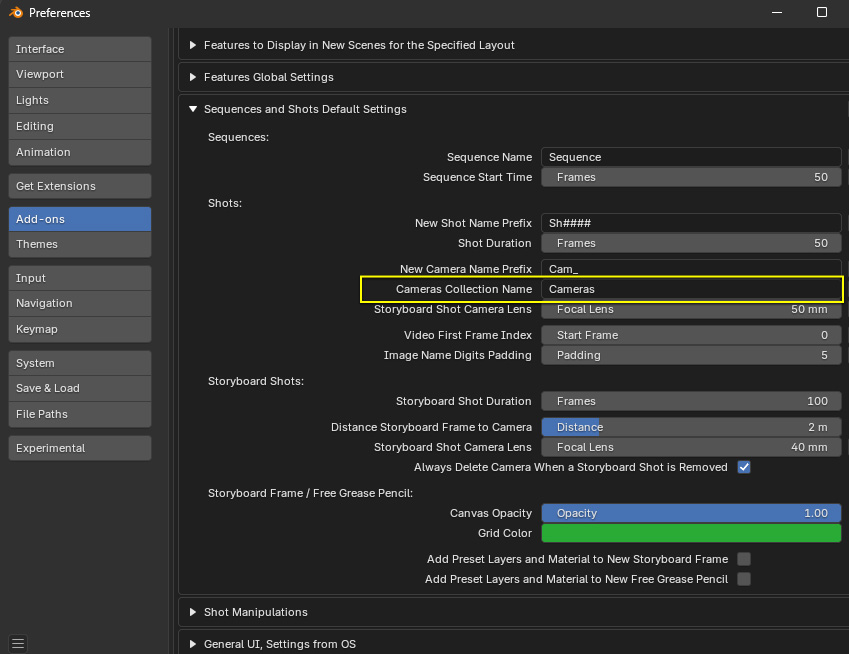
It is now possible to specify the default name of the collection you would like to use in the new scenes:
Once in a scene, from the main panel of StoryLiner, you will find a Collection Manager tool that will list the collections used by StoryLiner in that scene. The expected name of the collection is presented, followed by the collection that is used in practice. If no collection is assigned yet, one will be created with the expected name (plus a suffix if that name already exists for a collection in another scene for example) when an entity require it.
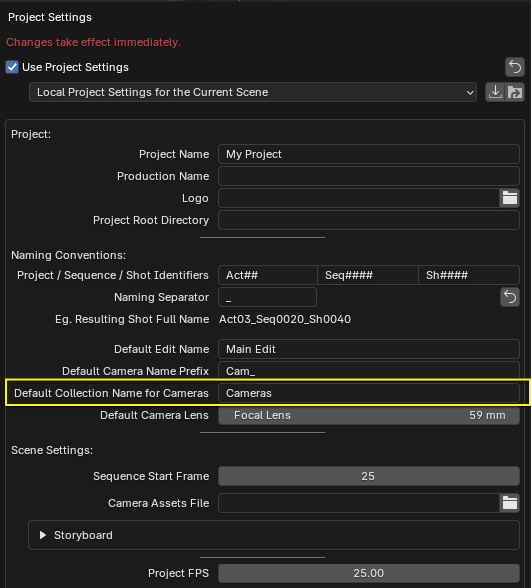
It is also possible to define a cameras collection name for your project thanks to the Project Settings.
Exposition of the default value for the camera field-of-view
The default camera lens can now be set in the Preferences of the add-on, as well as in the Projects Settings.
Storyboarding
- Offset a shot of type “Storyboard Shot” in the Shots Stack now completely offset its content in time. It’s not just its children that are offset but also the camera itself (if animated) and all (ALL, not just its storyboard frame) its children.
Reminder: the camera of a Storyboard Shot is not supposed to be part of the action, so it is not dependent on the timing of this action occurring in the scene, it should be possible to place it at any time.
Animation
Animation Right-Click Toolbar
Finding the keyframes of an animated property in the Dopesheet is sometimes tricky. Thanks to this new tool, it is possible to navigate from keyframe to keyframe for a given property, and to select then in order to frame them with the standard framing shortcut (“.” key) when in the Dopesheet editor.
To use it, just right-click on an object property in the Property panel.
Render edit as animated Gif
In the Snapshots section of the Render Panel, a new option has been added to generate a Gif file with all the generated snapshots.