StoryLiner V1.6 for Blender 5
This version is based on StoryLiner V1.5 and the main different is that it works on Blender 5.1 and 5.2
For Blender 5.2 STL, a StoryLiner V1.7 with dedicated features is currently on the way.
— Available Now !!! —
Current available version is: StoryLiner V. 1.6.61 (July 8th, 2026)
The package is available in your product page on SuperHive Market (formerly Blender Market). Follow these instructions for the installation.
Important notes
- I’m highly looking for feedback. When you test the version, please share your thoughts and experience with me on the Spitfire Storyboards Discord – StoryLiner support channel or by sending me an e-mail.
- Features presented below may be available in some package editions of StoryLiner only. See the Differences Between Editions.

💡💡💡 Same advice as usual when using StoryLiner: Watch the tooltips !!! 💡💡💡
Latest Changes
- V 1.6.61:
- This version now supports Blender 5.2
- Fixed an issue with the Shots Stack and one with the output color
- V 1.6.50:
- Added global control tools to set the SL Lens and other storyboard frame settings
- All the note properties of a shot are now exported in the edit Json file
- Fixed an issue with the rendered video for the sequence that appeared too dark
- V 1.6.41:
- Fixed the internal feature to save the StoryLiner add-on preferences
- Fixed many little errors due to the API changes in Blender 5.0 and 5.1
- V 1.6.21:
- Merged all the changes from StoryLiner V1.5
- Now supports OpenTimelineIO v0.18 instead of v0.16
- Fixed many bugs related to the changes in Blender 5 Python API
- Fixed an error message in the Retimer
- V 1.6.14:
- Fixed several bugs that were generating errors during rendering
- Merged all features from V 1.5
- V 1.6.10:
- Easier installation, security increased!
StoryLiner now uses its own Python virtual environment. The installation is now as simple as drag and dropping the add-on package into Blender and press Ok. Admin mode and Blender restart are not required anymore - Added the new Camera Background settings from V 1.5.10
- Easier installation, security increased!
- V 1.6.04:
- Added the Camera Background rendering feature introduced in V 1.5.4
- V 1.6.03:
- First “working” version (in spite of several error messages in the log)
Storyboarding
Improved precision when drawing on the Storyboard Frames and Free Grease Pencils
As you know, when we draw onto a grease pencil object, the size of the brush stays proportional to the scale of the object. When drawing on Storyboard Frames, this had the drawback that it was uneasy to set a very low radius to the current brush. This has been fixed thanks to the introduction of a new property called Precision Scale Factor and now, by default, it is possible to have a precision 10 times superior on new Storyboard Frames.
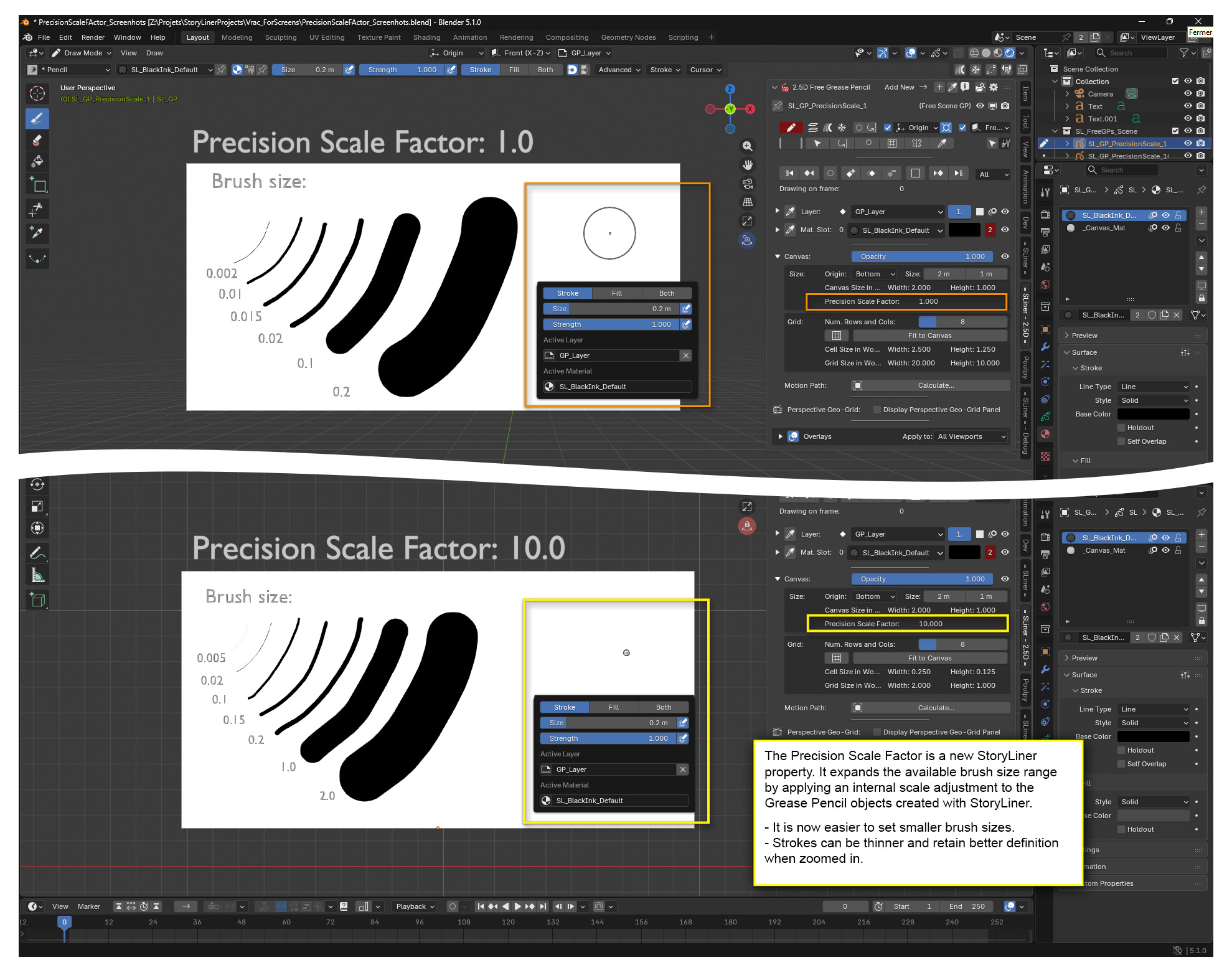
Note that this only affects new scenes, in order to keep the scale of the grease pencil of the shots consistent when in the same scene.
The Precision Scale Factor is defined per scene. The default value used when StoryLiner is instantiated in a new scene is set in the add-on Preferences, in the section named Sequences, Shots and Free GPs Default Settings. The current value is set to 10.0, the legacy value is 1.0.
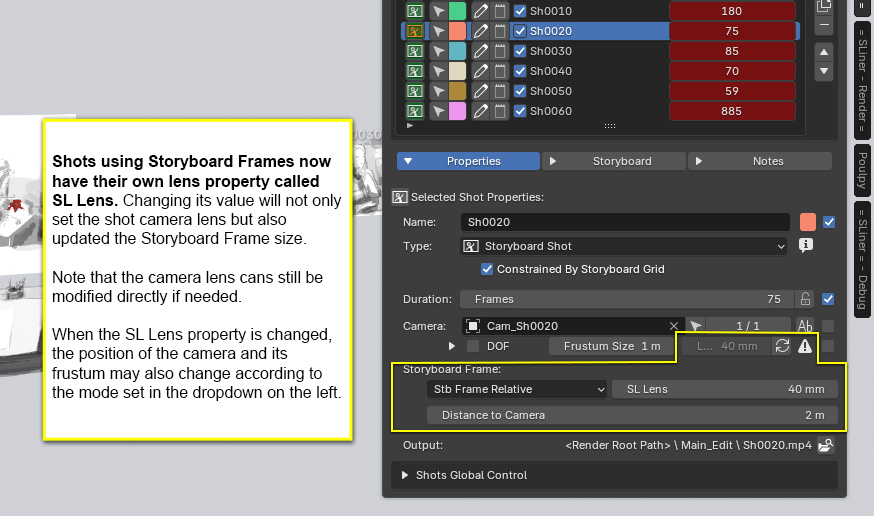
Introduction of a SL Lens property to for better update of the Storyboard Frame size
Up to now, when the lens of the shot camera was modified or animated, the size of the Storyboard Frame of that shot was not updated and it was necessary to click on the Update button.
Now, if the camera lens is controlled with the new shot parameter called SL Lens, the lens AND the Storyboard Frame size are modified together in a consistent way.
Note that it is still possible to use the camera lens property if prefered.
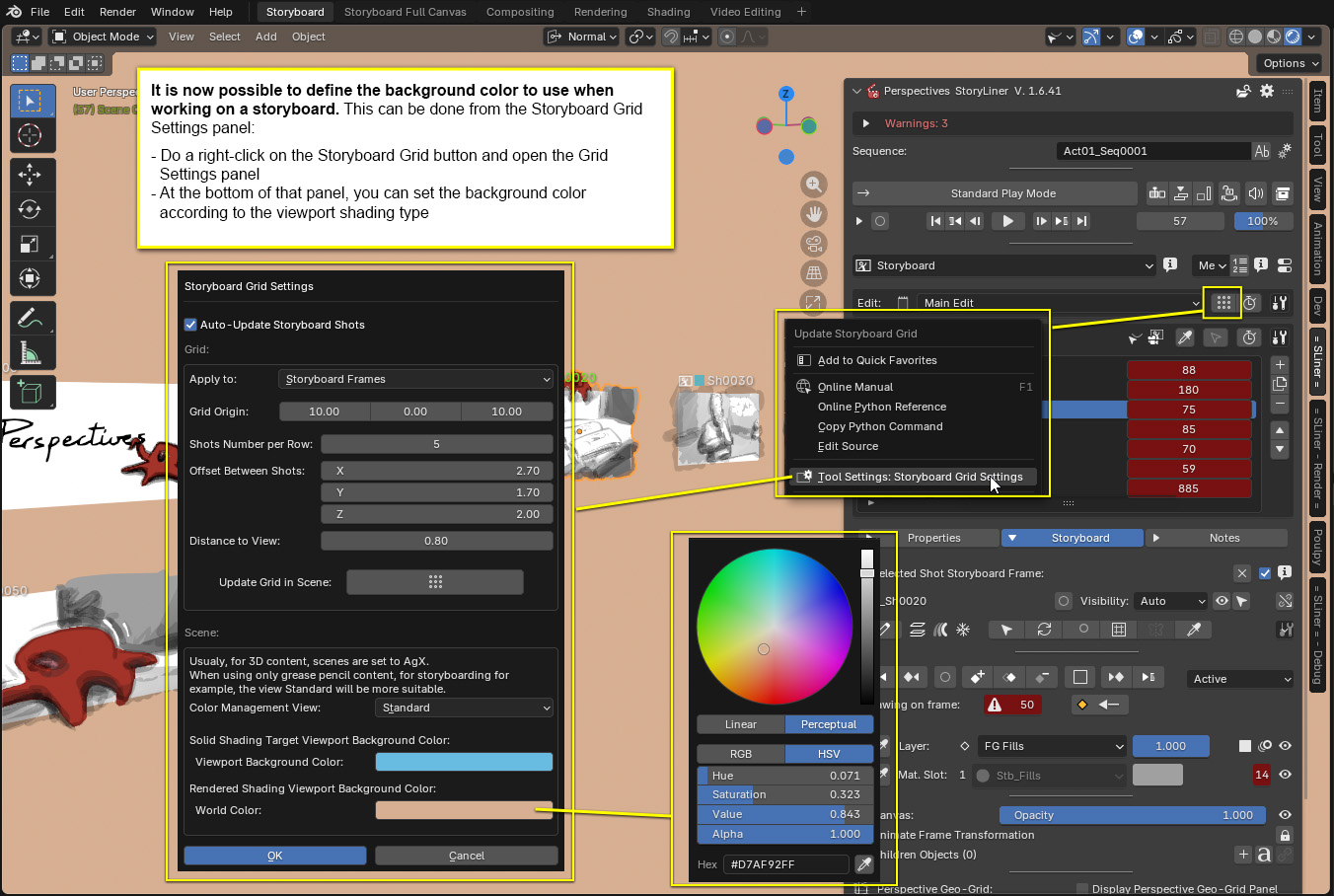
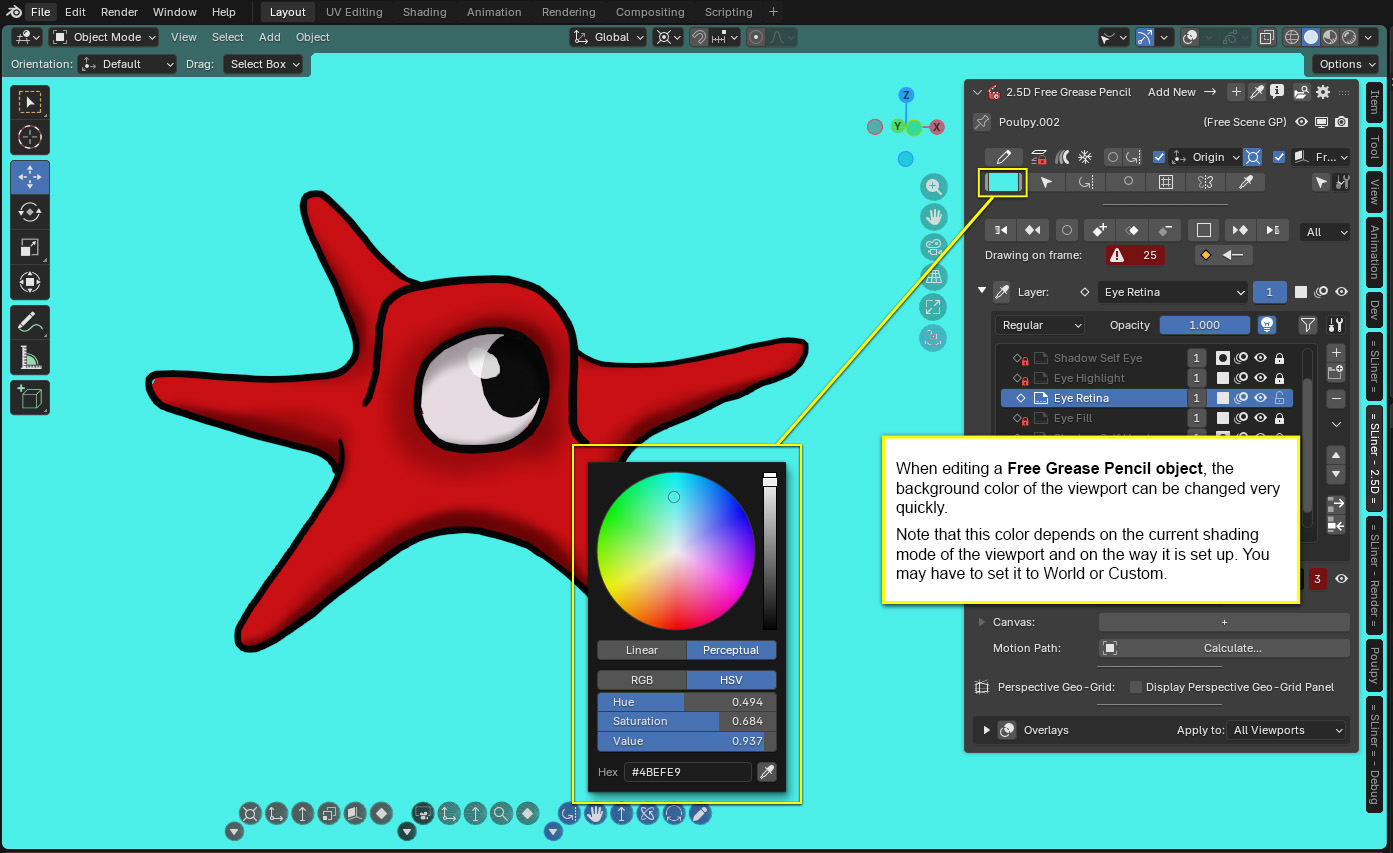
Easy control of the viewport background color
When sketching or storyboarding, we often need to change the background color of the viewport in order to have a better contrast for example. According to the type of asset you are working on, this can be done:
- from the Storyboard Grid Settings panel:
- from the 2.5D Free GP panel:
UX / UI
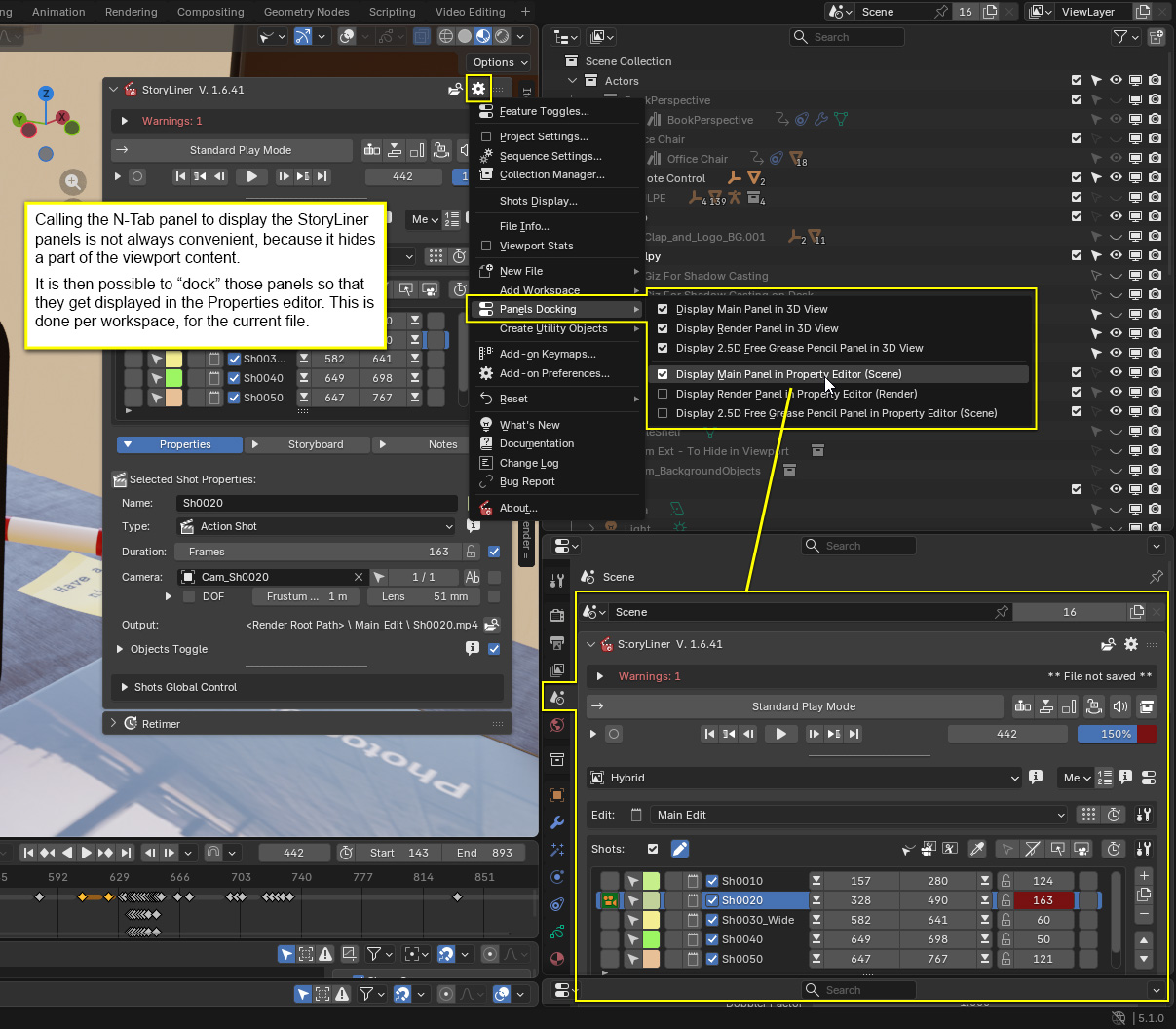
StoryLiner panels displayed in the Properties editor
It is now possible to display the StoryLiner panels (the main panel, the Render panel and the 2.5D Free Grease Pencil one) directly into the Property editor rather than in the N-Tab panel (or in addition to, if needed). This is very convenient to create custom workspace layouts such as the ones provided with StoryLiner.
This feature has also been introduced because the behavior of the N-Tab panel changed in Blender 5.1: when its owning viewport size is reduced, the N-Tab panel width is also reduced and is now keeping the minimal width it gets instead of its previous one, which is not convenient at all. Having the StoryLiner panel in the Property editor is a way to better handle its size.
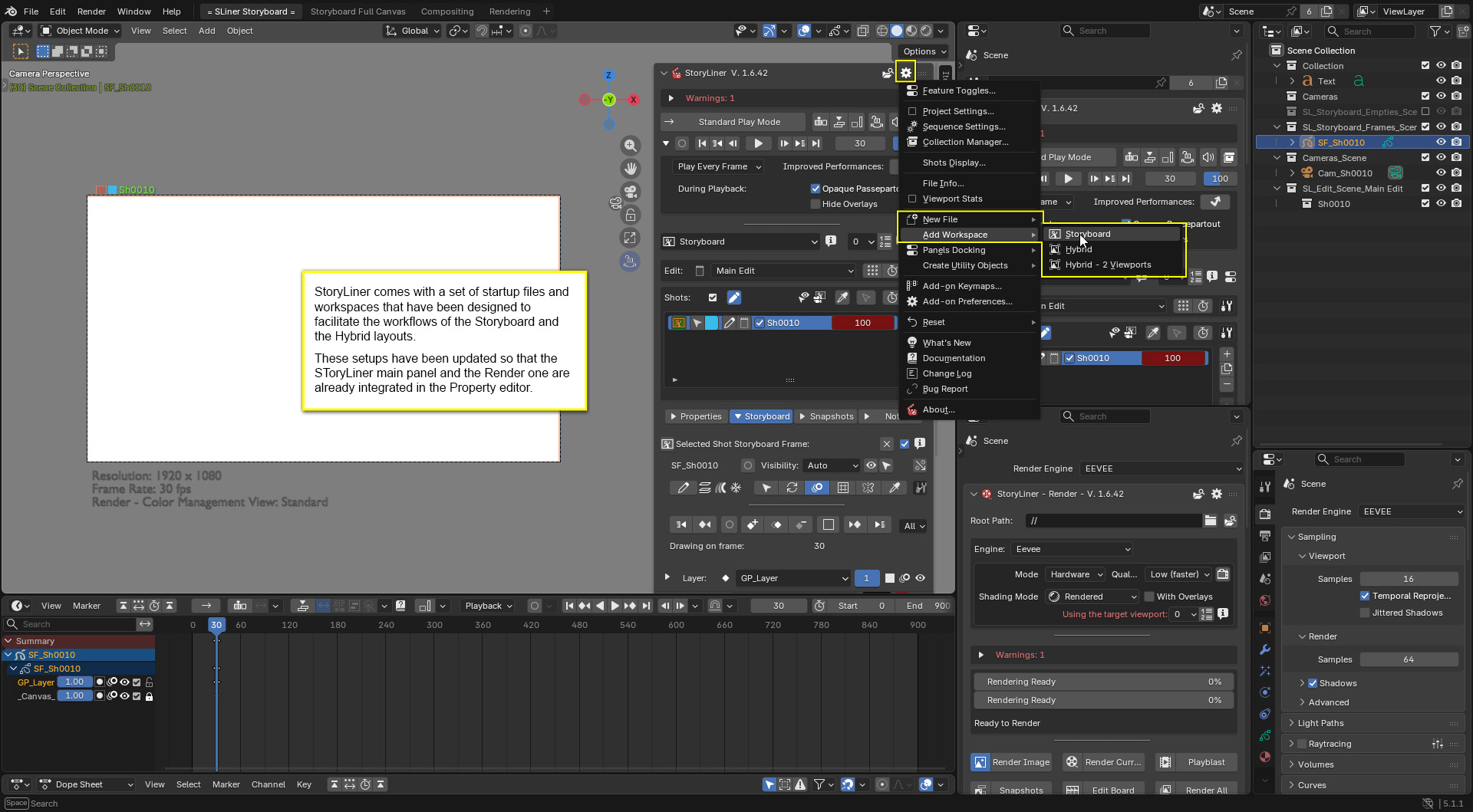
Dedicated workspaces for previz and storyboarding
StoryLiner offers 3 different workspaces that can easily replace or be added to the current Blender file in order to have an editor layout that really fits your workflow:
- Storyboard
- Hybrid
- Hybrid – 2 viewports
Bug fixes
The list of the bugs and issues that have been fixed to make this version of StoryLiner is quite huge. Indeed many little changes here and there were required to make the code fit the Blender 5 Python API requirements. Here are some of the most significant ones.
- Fixed an issue on Mac in the GetPythonPath() function
- Fixed the GetPythonPath() function to provide a correct folder path for the venv on Linux
- Fixed invalid path for Python folder in the venv on Linux
- Fixed canvas fill display to match Blender 5.1 changes
- Replaced context.object by context.active_object at many places to match changes of Blender 5 API
- Fixed error message related to the generation of the Edit file when rendering in All mode
- Fixed error message in getOwnerObjectAndProp() when owner is not found
- Fixed error in the Retimer due to current scene not set on the sequencer
- Fixed little UI display issue on overlay frames when Edit Timeline is hidden Draw mode
- Fixed several animation data issues related to the Python API changes of Blender 5
- …